An AbacusEducalc.net Pte Ltd - HP Calculator
Jump to: What's new here? Comments & Talk Back
Home » + Sales & Service » HP Heritage » HPCalc Timeline » HP 39g+ » 

The is an out-dated procedure.

The HP 39/40 (aka Conn3x) connectivity kit allows you to transfer aplets(tm), list, matrices, programs and notes from your HP39G+ (including HP39gs, HP40gs) calculator to your PC.

In order to use the HP 39/40 connectivity kit, you must have installed the HP Graphing Caluculator USB drivers (available on the CD) and have properly connected your HP 39/40 calculator to your PC using the provided USB cable.

Download the following files:

  • HP 39/40 Calculator Connectivity Kit Version 2.1 Build 1218
    To install it, you should first un-install the existing software if you've installed the CD version. Then download the package into an empty directory, unzip it, and run the SETUP.EXE file.
  • HP Graphing Calculator USB Driver - extract them directly into C: and the "UsbDriver" subfolder will be created.
  • Tetris2, a very nice Tetris game for all HP graphing calculators. Create a folder name "C:|9GP" and unzip the content there.

When you plug in the HP calculator, the computer will prompt you "Found New Hardware Wizard". Follow the wizard by click the Next button. When prompted "File Needed", type C:UsbDriver and then click Ok.

To use the HP 39/40 connectivity kit, connect your HP 39/40 to your PC, turn it on and start the HP 39/40 connectivity kit.

In order to transfer date from/to the calculator to/from the PC:

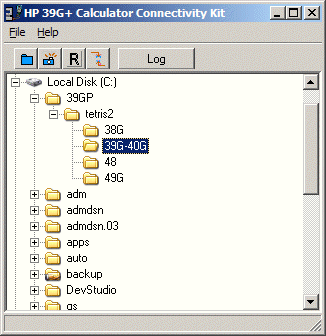
  1. On the PC, Start the HP Calculator Connectivitiy Kit.
    connx3
  2. If this a grey box instead of the usual explorer, then there may be a connection error. Use the procedure below to establish a proper link up:
    • the calculator is turned on
    • the calculator is properly connected to the PC
    • the USB drivers are installed
    • The battery in the calculator are good

      Then, disconnect the calculator from the PC for 5 second and reconnect it. You should then be able to select HPx9G+.
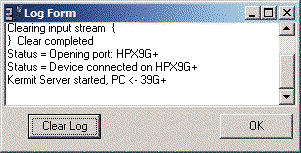
  3. Turn on the Communication Log by clicking on the Log button.
    connx log
  4. On the PC, select the directory where the program is located
    C:|3GP etris2|9G-40G
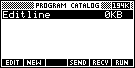
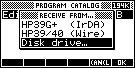
  5. To receive data/program from the PC: On the calculator, Press {Shift} {Program} and press the [RECV] option. The select the "Disk drive" option and select " OK ".

    1

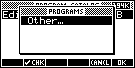
    "Preparing to get program" and the following screen will appear.

    3
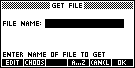
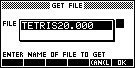
  6. Select [ OK ] and it will prompt for a file name. Select [ CHOOS ] and then Select [ OK ] to pick "TETRI20.000".

    4 5

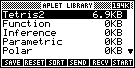
    You will notice the log form on the PC displaying the communication status. Upon completion, press the {APLET} button, and the following will be display.
    6

    Select Tetris2 and then press the [ START ] button and have fun!

commentPost your comment

Hi Ariel,

OZ Joshua had developed NoteMaker some years ago. You should be able to download it from JKING OK. There are sufficient information there to get you going.

In reply to Ariel:
Hi, what program do you use to create notes on the computer? and how do you send these notes from the computer to the calculator? (step by step instructions please?)

Peter Tong
10/29/2008 8:11:58 AM - SG  | commentreply


Hi, what program do you use to create notes on the computer?
and how do you send these notes from the computer to the calculator? (step by step instructions please?)

Ariel
10/29/2008 5:54:11 AM - AU  | commentreply


Hi, the current (new) version does not have the "Log" button. You should still be able to transfer aplets and notes to your calc.

In reply to Ariel:
Hi, i used the connectivity program from the disc (HP 40gs,39gs,39G+Calculator Connectivity Kit), and it does not have a log button like the example does? How can i transfer notes aplets from my computer to my calculator?

Peter Tong
10/27/2008 6:41:37 AM - SG  | commentreply


Hi, i used the connectivity program from the disc (HP 40gs,39gs,39G+Calculator Connectivity Kit), and it does not have a log button like the example does? How can i transfer notes aplets from my computer to my calculator?
Ariel
10/27/2008 3:15:57 AM - AU  | commentreply


Hi, i cant get anything across to the calculator it says preparing to get program then a few seconds later says timeout
Liam404
10/26/2008 11:21:36 PM - NZ  | commentreply


Hold Down the on Buttom and the very top left and top right at the same time to wipe the calculator memory. It will delete the tetris aplet.

In reply to :
how do you delete the tetris aplet???? Help

Anonymous
8/12/2007 7:20:44 AM - AU  | commentreply


Hold Down the on Buttom and the very top left and top right at the same time to wipe the calculator memory. It will delete the tetris aplet.

In reply to :
This tetris aplet can´t be deleted and causes calculator errors... there seems to be something in the code which makes it keep communicating with your calculator´s chip so it drains the batteries and then, eventually, the calculator breaks down. Unfortunately, there´s no way to delete it if you have this problem; however, the problem only seems to happen for those who use the 2player mode.

Anonymous
8/12/2007 7:20:09 AM - AU  | commentreply


We could perform a Factory Reset to the calculator. See link: http://www.educalc.net/1120482.page. If the battery is drained, you could replace with a fresh set of batteries.

In reply to :
This tetris aplet can´t be deleted and causes calculator errors... there seems to be something in the code which makes it keep communicating with your calculator´s chip so it drains the batteries and then, eventually, the calculator breaks down. Unfortunately, there´s no way to delete it if you have this problem; however, the problem only seems to happen for those who use the 2player mode.

Peter Tong
6/17/2007 9:50:49 PM - SG  | commentreply


This tetris aplet can´t be deleted and causes calculator errors... there seems to be something in the code which makes it keep communicating with your calculator´s chip so it drains the batteries and then, eventually, the calculator breaks down. Unfortunately, there´s no way to delete it if you have this problem; however, the problem only seems to happen for those who use the 2player mode.
Anonymous
10/16/2006 11:22:31 AM - AU  | commentreply


HOW DO DELETE THIS!?!?!?!?!?!
Anonymous
2/3/2006 8:32:26 PM - AU  | commentreply


how do you delete the tetris aplet???? Help
Anonymous
11/3/2005 8:48:21 PM - AU  | commentreply


this website is very useful!
n/a
9/17/2005 5:55:37 PM - AU  | commentreply


Mail this pageMail this page


Professional Real Estate Problem Solving; Using the HP12c; More Real Estate Books...


Essential Equations for the FE Exam; Civil Engineering PE Exam; More Engineering Books...