
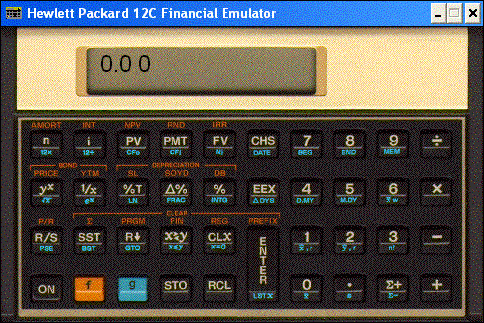
The HP-12C calculator is a programmable financial calculator utilizing reverse polish notation with a 4 register stack, 99 program lines available for programs, financial registers, 20 data storage registers, and continous memory.

Functions include percentage, statistics, linear estimation, calendar, financial, depreciation, bond price and yield, discounted cash flow analysis. Calculator programs feature conditional branching and looping. Also, the calculator has the ability to store multiple programs. Applications for this calculator include the fields of real estate and lending, mortgage brokering, stocks and bond trading, leasing, and banking.
To register send check or money order payable to:

Mark H. Shin, dba Telemark Software
P. O. Box 2195
La Jolla, CA 92038

The registration fee is $34.95 US. Foreign country orders add $5.00 US for shipping. CA residents add 7.75% Sales Tax. Please allow 10 days for delivery via first class mail.

by Grapevine Publications.

Download - File Size = 1200 KB

NOTE: This software does not run on 64-bit Windows 7 or Windows Vista.


Response to HP 12c Emulator

  1. On 16-Jan-2012, Bob Johnson wrote: To Reply Bob Johnson 
    Typo Error? Click here to edit your message!
    I downloaded the HP 12C emulator zipped file, but it won´t extract or install on my Win7 Pro PC. Is this a known issue or is there a solution posted somewhere? Thanks, Bob Johnson

  2. On 30-Jul-2011, Charles wrote: To Reply Charles 
    Typo Error? Click here to edit your message!
    Do you have a version compatible with Windows Vista running on 64-Bit machines?
    • On 19-Apr-2012, E replied: Typo Error? Edit your message:
      I found this link about running Windows 7 in Windows XP mode but haven´t tried it:
      http: windows.microsoft.com en-US windows7 install-and-use-windows-xp-mode-in-windows-7

  3. On 16-May-2010, Bigdave wrote: To Reply Bigdave 
    Typo Error? Click here to edit your message!
    On Dell Inspiron 1720 with XP pro and display resolution of 1920x1200 pixels, the calculator image is smaller than the window containing it. Consequently the mouse pointer is not referenced correctly with respect to the image. eg (a) to enter say 4 in the calculator display the mouse must be clicked between the [2] and [3] keys of the displayed calculator image; or (b) to clear the calculator display the mouse must be clicked between the [0] and [ENTER] keys on the displayed calculator image. Is there an easy way to correct this resolution mismatch issue?

  4. On 15-Mar-2010, Shawn wrote: To Reply Shawn 
    Typo Error? Click here to edit your message!
    I´m anxious to try out this 12c emulator, but it won´t install on 64 bit Windows 7 and none of the compatibility settings I´ve tried have helped. Any advice?

  5. On 21-Oct-2009, Babs wrote: To Reply Babs 
    Typo Error? Click here to edit your message!
    How can I change in the display from Comma to Point in the emulator?

    On the calculator it is done so:
    Turn off the calculator.
    Hold down the decimal point.
    Continue to hold the decimal point key, while turning on the calculator.
    The comma should change back to a decimal point.

  6. On 26-Jun-2008, JACK wrote: To Reply JACK 
    Typo Error? Click here to edit your message!
    I am looking for a HP 17BII emulator for the iPhone. Can you guys give a hint to where I would find it?


  7. On 05-Apr-2008, Just Another Iphone Fan wrote: To Reply Just Another Iphone Fan 
    Typo Error? Click here to edit your message!
    for the HP-12C emulator for the iphone just add the repo http: modmyiphone.com install.xml in the installer.app then install the emulator. That is all.
    • On 05-Apr-2008, Just Another Iphone Fan replied: Typo Error? Edit your message:
      my mistake: the repo for the installer.app is modmyifone installer.xml

  8. On 30-Oct-2007, BENTE wrote: To Reply BENTE 
    Typo Error? Click here to edit your message!
    I am looking for a HP 12C emulator for the iPhone. Can you guys give a hint to where I would find it?

  9. On 31-Jan-2005, Rahim wrote: To Reply Rahim 
    Typo Error? Click here to edit your message!
    Hi Gentlemen

    May any one advise me where to find an operation manual for the calculator which comes with the Palm Tungsten T5 (particularly the financial calculator). No reference is made to it in the original Tungsten T5 manual which came with the device.

    Thank you for the help.
    Rahim

  10. On 24-Mar-2004, Peter Tong wrote: To Reply Peter Tong 
    Typo Error? Click here to edit your message!
    Thanks, TelemarkSoftware. I have check them out. Looks good! Here is the Link...
    http://www.kktechnologies.com/kk-12c.html
    Educalc.net webmaster

Leave your message, comment or feedback:
Your Name & E-mail is used only to alert you when someone reply your message.