
On the HP50g Calculator Side:
-
Press {Right Shift} key (Red key) and then {SYM} key (CAT key).
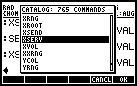
Scroll down and highlight XSERV
-
Press {Enter} to select, and {Enter} to start command.
-
The HP50g will display:
Xmodem Server
Waiting for command
On the PC Side:
-
Download and install the software.
-
Start the HP CONNX4 Application.
-
Change Connect using: USB Calculator and Speed: 115200
-
Select File menu and choose Connect option.
-
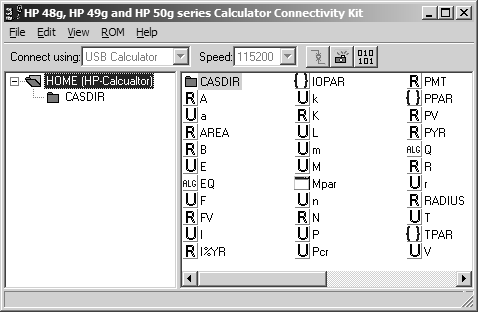
If the connection is successful, the left panel will show
HOME
- CASDIR
-
Click on CASDIR, the right panel will show a list of files inside the CASDIR folder in the calculator.
To terminate the communication link with HP50g, you can either press the HP50g {ON} button once or on the PC, click on File and choose Disconnect.
FYI: This procedure is for HP50g but it is also applicable for HP49g+ Graphing Calculator.
Click the [>] Run Button to re-run the tutorial video.