
HP Graphing Calculator USB Device Driver
This is the same driver for HP 39g+, HP 39gs, HP 48gII, HP49g, HP49g+ and HP 50g Calculators.
Manufacturer: HP Company
Location: HPx9G+ Device
Driver Provider: KinpoSH
Driver Date: 2003.07.12
Driver Version: 1.0.4.0
Driver Details: %windows%\system32\drivers\hpx9g+.sys
Here is the quick procedure of how you can obtain and install the USB drivers. This procedure is applicable for HP 40gs, HP 48gII and HP 50g Calculators.
Note: This procedure is also similar if you have the Vista Operating System.
I) Downloading and extracting the file
Download (File Size: 24KB)
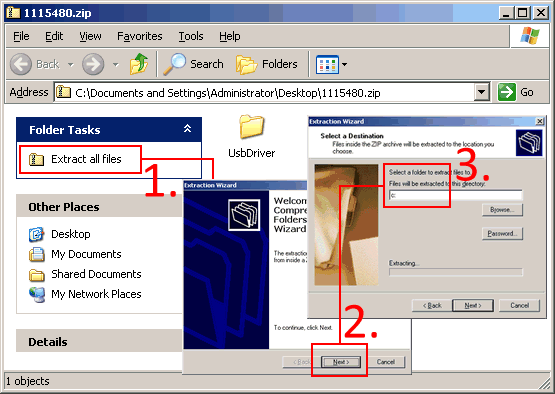
After you have downloaded the software and double click on the zip file and you should see the screen like the above. Follow step 1 to 3 and one step 3, type in *C:* and click the next button. This will extract the files inside zip file and put them in c:\UsbDriver folder on your computer hard disk.
II) Installing the Calculator USB driver
Plug in the cable between the calculator and the computer. You should be able to hear a USB detection and if the driver has not be previously installed, the ‘Found New Hardware Wizard’ will appear.
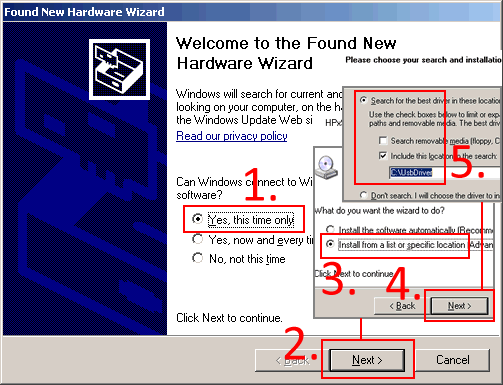
On step 5., remember to change the location of the file to C:\UsbDriver so that the installation wizard knows where to look for it. If you are prompted ‘Hardware Installation… HPx9g+ DEVICE…’, do click on the ‘Continue Anyway’ button.
III) Check that the USB driver has been properly installed
-
Right click on My Computer icon on the desktop.
-
Select Properties
-
Select Hardware Tab
-
Click on Device Manager, and scroll down to ‘Universal Serial Bus controller’.
-
Click on the [+] icon to expand this key.
-
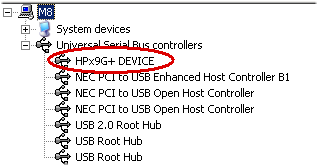
Look for HPx9G+ Device.
Below is the newer USB Driver for HP49G+. If your driver version is smaller than 1.2.0.0 then you may want to download and update it.
To check your driver version…
-
Right click on My Computer icon on the desktop.
-
Select Properties
-
Select Hardware Tab
-
Click on Device Manager, and scroll down to ‘Universal Serial Bus controller’.
-
Click on the [+] icon to expand this key.
-
Look for HPx9G+ Device (if you can see this, re-connect up your calculator and turn it on).
-
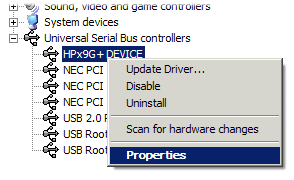
Right click on it.
-
Select properties and verify the version.
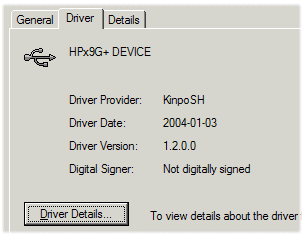
Location: HPx9G+ Device
Driver Provider: KinpoSH
Driver Date: 2004.01.03
Driver Version: 1.2.0.0
Driver Details: %windows%\system32\drivers\hpx9g2k.sys
To update this driver:
- Download (File Size: 18KB) and unzip contents into as a folder.
- Right click on the HPx9G+ Device node and select the ‘Update Driver…’ option.
- Point the unzipped folder.