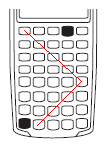
Press [ON] to turn on the calculator. Press and hold [ON] button and [PMT] button. It will display the AMORT. Press the following keys one key at a time, sequentially:
[N] [MU] [CFl] [RM] [/] [6] [2] [0] [ON]
The screen would change as you press the keys and the on reaching the last key, it should display GOOD for about 1 second.
The below graphics shows the path of the keystrokes that starts with [N] and ends with [ON].