
An AbacusEducalc.net Pte Ltd - HP Calculator
Jump to: What's new here? Comments & Talk Back
Home » + Calc Solutions » 

HP 17bii+ - Test Procedure

Press [ON] and 4th soft key counting from the left [ ^ ] keys together, the following screen will be displayed.
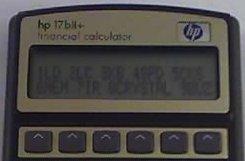
17bii

Then select which test you want to perform or Press [ON] Press 3rd soft keys [ ^ ] togehter to stop testing procedure.

For example:  Press [1] to test the LCD.  Press [9] to test the Buzzer.

HP 17bii - Test Procedure

Press CLR & the 5TH menu keys (above the word printer) simultaneously. To stop the process Press CLR & the 3rd menu keys simultaneously.

HP 17bii - Test Procedure commentPost your comment  


Mail this pageMail this page

Retailers
India Indonesia Malaysia Philippines Singapore Thailand

Stay current by subscribing to our free calculator digest

HP Calc Heritage

Note: All prices quoted on this site does not include taxes and tariffs. Actual prices may vary. Check with your nearest resellers for local pricing.