
The break-even point for a product is the point where total revenue received equals the total costs associated with the sale of the product (TR=TC). A break-even point is typically calculated in order for businesses to determine if it would be profitable to sell a proposed product, as opposed to attempting to modify an existing product instead so it can be made lucrative. Break-Even Analysis can also be used to analyse the potential profitability of an expenditure in a sales-based business.
The HP 20b Menu Map for the Break-even Menu.
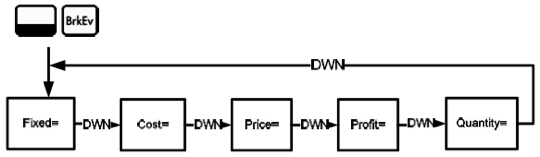
Press [Shift][BrkEv] to open the Break-even menu. Starting with Fixed=, input known data by entering a number and pressing [INPUT]. Scroll to the unknown variable by pressing [Down Arrow] or [Up Arrow] repeatedly. Press [=] to calculate it.
To reset the Break-even menu, from anywhere in the menu press [Shift][Reset]. With ‘BrkEven’ displayed, press [INPUT] to reset the menu or [ON/CE] to cancel.
HP 20b Break-Even Example
The sale price of an item is $300.00, the variable cost price is $250.00, and the fixed costs are $150,000.00. How many units would have to be sold to break even (profit = 0%)? This example is shown in with RPN as the active operating mode.
Press [Shift] [BrkEv] to open the Break-even menu starting with the current value for ‘Fixed’ costs. Enter 150000 and press [INPUT] the current value for fixed costs as 150,000.00. Press the [Down Arrow] key display the current value for ‘Cost=’. Enter 250 and press [INPUT] to input the current value for cost as 250.00. Press the [Down Arrow] key to display the current value for ‘Price=’. Enter 300 and press [INPUT] to input the current value for price as 300.00. Press the [Down Arrow] key to display the current value for’Profit=’. Enter 0 and press [INPUT] to input the current value for profit as 0. Press the [Down Arrow] key to display the current value for ‘Quantity=’.
For the Answer: Calculates the current value for the unknown item. On the ‘Quantity=’ prompt, press the [=] key, it will display 3000. 3,000 units would have to be sold to return a 0% profit.