
An AbacusEducalc.net Pte Ltd - HP Calculator
Jump to: What's new here? Comments & Talk Back
Home » HP 20b *New » 

HP 20 b Keyboard & Display Reference

HP 20b

HP 20b uses a new "soft touch & feel" keyboard technology.

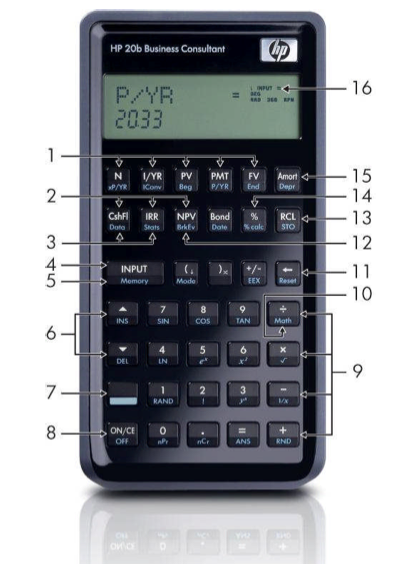
Keyboard and Display:

  1. Time Value of Money keys.
  2. Cash Flows, IRR, and NPV menus.
  3. Data and Statistics menus.
  4. Large Input key.
  5. Memory key (shift).
  6. Up/Insert and Down/Delete keys.
  7. Shift key.
  8. On/Off key.
  9. Mathematical functions (Divide, Multiply, Minus, Plus Keys).
  10. Math Menu (shift).
  11. Backspace key and Reset menu (shift).
  12. Break-even menu.
  13. Recall key and Store key (shift).
  14. % key and Percent Calculation menu (shift).
  15. Amortization anddDepreciation menus (shift). 
  16. LCD Annunciator Display Area.

HP 20 b - How to:

HP 20 b 15-digit Precision

HP 20 b Adjusting the HP Calculator Display Contrast

HP 20 b Change Decimal Places to Display

HP 20 b Clearing Memory

HP 20 b Selecting the HP Operating Language

HP 20 b Switch to Algebraic Mode

HP 20 b Switch to Chain Mode

HP 20 b Switch to RPN Mode


Mail this pageMail this page

Retailers
India Indonesia Malaysia Philippines Singapore Thailand

Stay current by subscribing to our free calculator digest

HP Calc Heritage

Note: All prices quoted on this site does not include taxes and tariffs. Actual prices may vary. Check with your nearest resellers for local pricing.